Inspect one screen.
OutSystems MCP reads the layout, events, data contracts, actions, and dependencies that define its behavior.
See the extraction checklist →- Screen + referenced Blocks
- Data, validation + roles
- Versions + unresolved dependencies
Move your screens to an independent web application using OutSystems MCP and BluKavantUI MCP.
Start with one screen. Inspect its layout, data and actions with OutSystems MCP, then use BluKavantUI MCP to find the matching web components and integration patterns.
This guide covers source discovery, dependency mapping, a runnable TypeScript + Express example, and release checks.
Your application’s business logic and platform services need their own implementation and verification.
Use the OutSystems model as your specification, then give its interface, logic, and platform services a new home.
OutSystems MCP reads the layout, events, data contracts, actions, and dependencies that define its behavior.
See the extraction checklist →BluKavantUI MCP supplies the web APIs and examples. Build the interface and replace the backend services in your chosen stack.
Explore the migration mapping →Test the original behavior, then run with OutSystems services and both MCPs disconnected.
Open the release checklist →The extracted behavior can guide work in many frameworks and external systems. BluKavantUI’s web SDK targets browser DOM interfaces. React, Vue and other frameworks can host it through lifecycle adapters. Native mobile interfaces, proprietary platforms and unsupported controls require separate implementations. Only the TypeScript + Express examples here have been exercised.
Working downloadable example
Mount the web SDK in a DOM element. Express owns the API and serves the built browser files. The complete example adds SQLite, sessions and an edit drawer.
Framework snippets demonstrate adapter boundaries. Supply your imports, typed options, loading/error state and backend; they are not complete framework starters.
// Browser: create once after the host element exists.
const grid = createGrid<Customer>(host, options);
const response = await fetch('/api/customers');
if (!response.ok) throw new Error('Load failed');
const { rows } = await response.json();
grid.setData(rows);
// Call grid.destroy() when the view is removed.The selection above updates this prompt. Replace the example module and screen with your own.
Work through the source checklist, then map each platform dependency to its replacement.
Choose your stack & copy a prompt →Start with a list and detail flow such as BluKavantUi_Pro_Showcase.ProShowcases.McpCustomerDemo. Record the source environment, module, screen, timestamp and SDK version. Note the user roles and each action a person can take. Save the module before extraction.
Keep your existing OutSystems MCP connection and add BluKavantUI MCP. Approve the editor connection through Service Studio when required. The assistant coordinates the two servers; neither server needs to call the other. Keep session credentials outside generated application source.
Ask the MCP client for its tools first. Our connected editor exposed listApps, getScreen, getServerAction, runQuery and getSerializedObjectByNameAndType. Tool names, argument schemas and access vary by installed integration; use the returned schema, not an assumed endpoint or fixed local port.
Read the layout, referenced Blocks and producer versions; screen inputs and local state; load queries, joins, filters and pagination; client events; server actions; entity attributes, identifiers and relationships; validation; role checks; transactions and external API dependencies. A screenshot alone does not capture these rules.
For each BluKavant control, read blukavantui_get_component with platform: "web" and fetch its example. Compare against the native contract. Carry over meaning, then use the web factory’s exact signatures. Preserve required theme/component styles and dispose instances when views unmount.
// blukavantui_get_component
{ "name": "Grid", "platform": "web", "section": "all" }
// blukavantui_get_example
{ "name": "Grid", "platform": "web" }
// Repeat for Drawer, Button and other controls used by the screen.Keep the extracted models, source timestamps/hashes, component versions, field mappings and unresolved dependencies with the project. Label cached snapshots and failed reads. Extracting entity definitions does not export the entity’s records or the user directory.
Stop the pending request and check for an approval dialog. Avoid repeated requests against an unresponsive editor. If restarting is necessary, save first when possible; force quitting can lose unsaved work. Continue from a known saved snapshot only when its age and coverage are recorded. A stream timeout does not mean the screen was exported successfully. Standard MCP clients should handle the transport and session lifecycle.
| OutSystems source | Independent replacement | Preserve and verify |
|---|---|---|
| Screen + Blocks | Page + BluKavant web factories | Layout, labels, events, responsive behavior, keyboard access |
| Locals, client actions | Typed state and event handlers | Loading, empty/error states, unsaved drafts, cancel behavior |
| Entity + structure | Database schema + JSON/TypeScript DTO | Identifiers, nulls, relationships, defaults, date/time and decimal semantics |
| Aggregate / Data Action | API read + database query | Permissions, joins, filters, sort, pagination, counts |
| Server Action | Backend service + transaction | Validation, business rules, retries, concurrency and audit history |
| Users, roles and session | Identity provider + authorization/session layer | Access to each endpoint and each record; browser visibility is insufficient |
| Timers, BPT, extensions | Scheduler, workflow worker, supported library/service | Retry rules, durable state, ordering and operational monitoring |
| Files, email, integrations | Object storage, mail and API adapters | Permissions, URLs, secrets, delivery and error handling |
In the customer example, only Name, Seats and Revenue are editable. Active, Joined and LastActivity remain read-only even though a shared source action can support other fields. Treat identifiers as strings when JavaScript number precision could lose information. Represent timestamps with an explicit timezone policy; keep date-only values distinct. The complete example stores money in integer cents.
Start small with a read-only grid, then explore the complete customer workspace.
Jump to the complete example →This first example is deliberately small: Express returns three synthetic customers, Vite builds the browser code, and the Grid displays the response. It has no OutSystems connections and no authentication or writes. Use Node.js 24 or newer.
# Unzip blukavant-express-grid-1.0.0.zip, then:
cd blukavant-express-grid
npm ci
npm run build
npm start
# Open http://127.0.0.1:3377/npm ci installs the locked dependencies. npm run build type-checks the code and bundles the frontend into dist/. npm start runs Express, which serves that directory and /api/customers from the same origin. This earlier v1.0.0 example retains the combined SDK 0.9.0 in vendor/; other packages come from npm. For new projects, use Community Basic Grid or install the licensed Pro Grid alongside Community, as shown in Getting started.
Express serves the browser build and a JSON API with three synthetic customers. Replace the fixture with an authorized database query when connecting real data.
import express from 'express';
import { fileURLToPath } from 'node:url';
import type { Customer } from './customer.ts';
const app = express();
const rows: Customer[] = [
{ Id: '1', Name: 'Atlas Labs', Seats: 12, Revenue: 2400 },
{ Id: '2', Name: 'Northstar', Seats: 24, Revenue: 4800 },
{ Id: '3', Name: 'Harbor Systems', Seats: 8, Revenue: 1600 },
];
app.get('/api/customers', (_request, response) => response.json({ rows }));
app.get('/api/health', (_request, response) => response.json({ status: 'ok', outsystemsRequired: false }));
app.use(express.static(fileURLToPath(new URL('./dist', import.meta.url))));
const port = Number(process.env.PORT || 3377);
app.listen(port, '127.0.0.1', () => console.log(`Open http://127.0.0.1:${port}/`));
The frontend and backend agree on these fields. TypeScript does not validate network data at runtime; validate external input at the API boundary.
export interface Customer {
Id: string;
Name: string;
Seats: number;
Revenue: number;
}
The native Grid Block becomes createGrid. Fetch the rows from your API, apply them with setData, and destroy the instance when its view is removed.
import '@blukavantui/web/theme.css';
import '@blukavantui/web/grid.css';
import { createGrid } from '@blukavantui/web/grid';
import type { Customer } from '../customer.ts';
import './style.css';
const host = document.querySelector<HTMLElement>('#customers')!;
const status = document.querySelector<HTMLElement>('#status')!;
const grid = createGrid<Customer>(host, {
RowKeyField: 'Id',
Mode: 'Client',
Rows: [],
Columns: [
{ Field: 'Name', Header: 'Customer', Flex: 2, MinWidth: 180, IsSortable: true, IsFilterable: true },
{ Field: 'Seats', Header: 'Seats', Type: 'Number', MinWidth: 100, IsSortable: true },
{ Field: 'Revenue', Header: 'Revenue', Type: 'Currency', MinWidth: 140, IsSortable: true },
],
Config: { Height: '400px', IsReadOnly: true, ShowEditToolbar: false, EnablePagination: true, PageSize: 10, CurrencyCode: 'USD' },
});
try {
const response = await fetch('/api/customers');
if (!response.ok) throw new Error('Customers could not be loaded.');
const data: { rows: Customer[] } = await response.json();
grid.setData(data.rows);
status.textContent = `${data.rows.length} sample customers loaded from Express.`;
} catch (error) {
status.textContent = error instanceof Error ? error.message : 'Could not load customers.';
}
// In a framework, call destroy() in its component unmount hook.
if (import.meta.hot) import.meta.hot.dispose(() => grid.destroy());
Pinned dependencies and scripts for installation, type checking, the browser build, and the Express server.
{
"name": "blukavant-express-grid",
"version": "1.0.0",
"private": true,
"type": "module",
"engines": { "node": ">=24.0.0" },
"scripts": {
"build": "tsc --noEmit && vite build",
"start": "node server.ts"
},
"dependencies": {
"@blukavantui/web": "file:vendor/blukavantui-web-0.9.0.tgz",
"express": "^5.1.0"
},
"devDependencies": {
"@types/express": "^5.0.0",
"@types/node": "~24.12.0",
"typescript": "~6.0.3",
"vite": "~8.3.4"
}
}
Check the browser and server code before running the app.
{
"compilerOptions": {
"target": "ES2023",
"module": "ESNext",
"moduleResolution": "Bundler",
"lib": ["ES2023", "DOM"],
"strict": true,
"noEmit": true,
"allowImportingTsExtensions": true,
"verbatimModuleSyntax": true,
"erasableSyntaxOnly": true,
"skipLibCheck": true,
"types": ["node", "vite/client"]
},
"include": ["*.ts", "client/**/*.ts"]
}
The page supplies the grid host and loads the TypeScript entry through Vite.
<!doctype html>
<html lang="en">
<head><meta charset="utf-8"><meta name="viewport" content="width=device-width,initial-scale=1"><title>BluKavantUI · Express starter</title></head>
<body><main><span class="eyebrow">TypeScript + Express</span><h1>A grid in your own application.</h1><p>Three synthetic customers, served by a standalone Node.js API. Sort a column to try the grid.</p><div id="customers" aria-label="Customer grid"></div><p id="status" role="status">Loading customers…</p></main><script type="module" src="/client/main.ts"></script></body>
</html>
Layout styles sit alongside the shared BluKavantUI theme and Grid stylesheet.
body { margin: 0; background: #f6f7fb; color: #1f2937; font-family: system-ui, sans-serif; }
main { max-width: 1040px; margin: 64px auto; padding: 0 24px; }
h1 { font-size: clamp(28px, 5vw, 42px); letter-spacing: -.04em; margin: 12px 0; }
p { line-height: 1.65; }
.eyebrow { text-transform: uppercase; letter-spacing: .12em; font-size: 12px; color: #5144c6; font-weight: 700; }
#customers { margin-top: 28px; min-width: 0; }
#status { font-size: 14px; }
The ZIP also includes the npm lockfile and the pinned BluKavantUI SDK in vendor/.
Node runs the server’s erasable TypeScript syntax; it does not type-check it or transform JSX. That is why the build runs tsc --noEmit separately. Vite handles browser TypeScript and CSS. See the Node.js TypeScript documentation, Express static-file guide and Vite production-build guide.
Open the browser Network panel. The example loads local assets and calls its own /api/customers. Close Service Studio and disconnect the MCPs: the page should still work. Calling a retained OutSystems REST endpoint is a valid hybrid architecture, but it still depends on OutSystems.
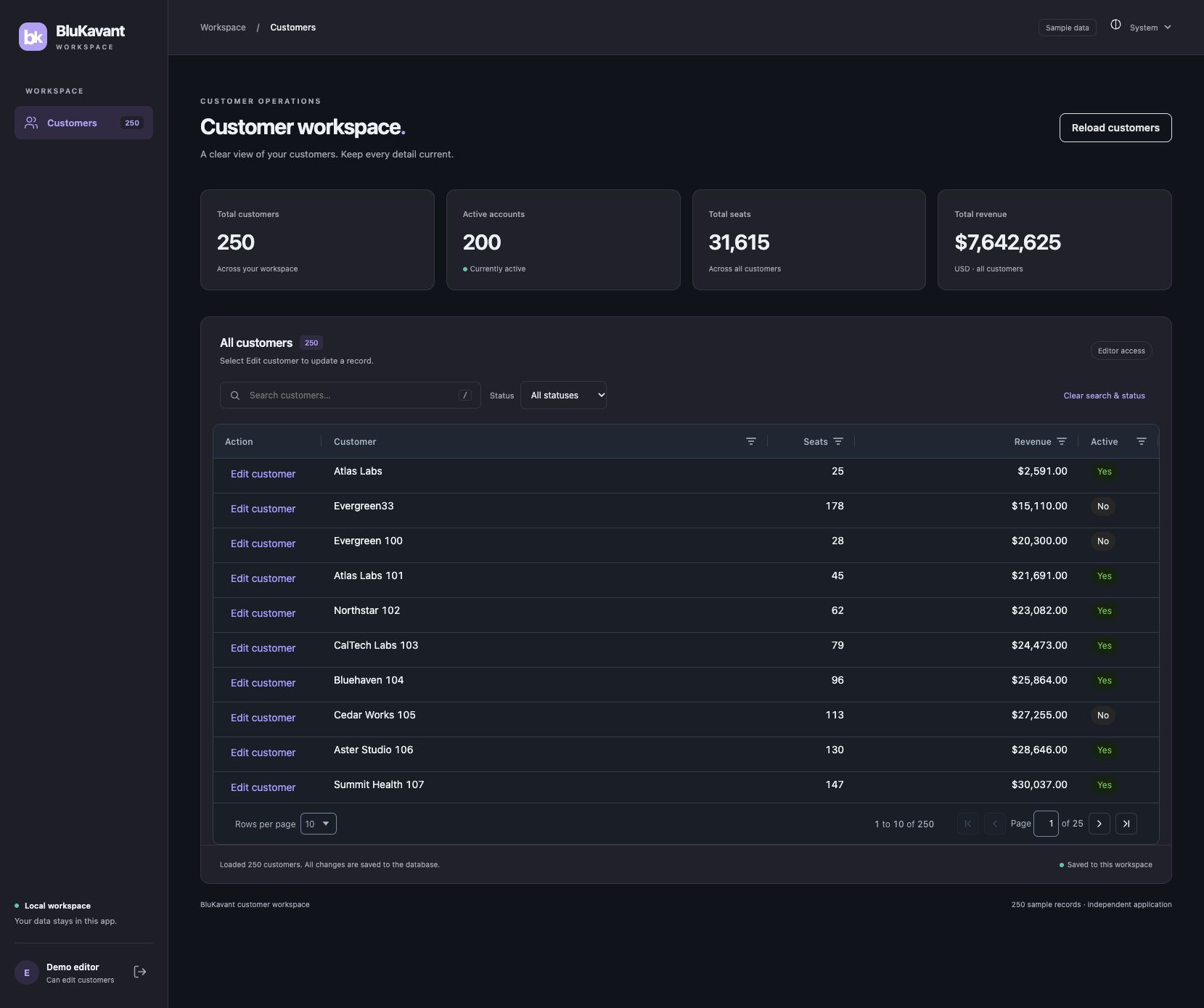
The companion app implements the more complete flow: 250 synthetic customers, search/filter/sort/pagination, an edit drawer, SQLite persistence, editor/viewer access, server validation, atomic writes, version checks and request deduplication.

# Unzip blukavant-customer-workspace-1.0.0.zip, then:
cd blukavant-customer-workspace
npm ci
npm run check
npm start
# Open http://127.0.0.1:3375/
# Choose Continue as editor or Explore as viewer.The public demo credentials are editor or viewer, password local-demo. This mode binds to loopback. The README documents APP_PASSWORD, HTTPS production cookies, database paths and the limitations of its single-account deployment mode. The example does not migrate your SSO, users or role assignments.
The workspace passed its TypeScript/build checks and 11 automated tests including the parent test. Browser checks covered save/reload persistence, cancel, filters, pagination, viewer access and a 390 px mobile layout. API checks covered authorization, CSRF, validation, stale versions, batch rollback and concurrent writes.
Live BluKavantUI MCP calls supplied the web contracts. OutSystems MCP discovery and a module inventory succeeded, but a fresh screen export stalled when Service Studio became unresponsive. This reconstruction used previously saved MCP screen/action/entity exports. Parity with the latest Service Studio model remains unverified.
The complete example separates the original record from the draft. The browser sends a request ID, the full original baseline and a full draft with only the three permitted fields changed. The server reads the current row inside a transaction, checks permission and validation, compares the expected version and baseline, then returns canonical saved rows with new versions.
POST /api/customers/save
Cookie: app-owned session
X-CSRF-Token: token from the current session
{
"requestId": "a-new-unique-id",
"changes": [{
"original": { "Id": "102", "Version": 3, "...": "all original fields" },
"draft": { "Id": "102", "Version": 3, "Name": "Northstar", "Seats": 63, "Revenue": 12500.50, "...": "unchanged fields" }
}]
}Use the actual Customer and request types from the download; the ellipsis above only indicates omitted fields. Expected outcomes include 401 for an absent session, 403 for forbidden access or a failed CSRF check, 422 for validation and 409 for conflicts. Keep the draft visible on failure. On success, replace the row with the server’s canonical response rather than assuming the submitted draft is the stored value.
Never trust a browser role flag, hidden field or disabled button. Enforce editable-field allowlists, numeric limits, record access and concurrency on the server. Persist idempotency outcomes in the same transaction as the writes so repeated requests cannot duplicate a change. An unknown network outcome needs reconciliation; it must not be presented as a confirmed save.
Use an authorized export/API or controlled migration job. Map keys and relationships, decimals, nulls, dates, binary files and external URLs. Load into a staging database first. Reconcile counts and totals, check representative records and keep a repeatable migration log. The examples on this page seed synthetic data only.
Connect your identity provider, map roles and record-level policies, and plan user provisioning or password reset. Reimplement scheduled jobs, workflows, email, files and integrations that the screen relies on. Put credentials in the deployment environment, not in frontend bundles.
Exercise empty/loading/error states, valid/invalid edits, cancel, reload persistence, expired sessions, forbidden access, concurrent updates and retry behavior. Check keyboard navigation and your target browsers. For remote datasets, verify paging/filtering on the server, not only against a small client fixture.
Choose the system of record, define a write freeze or final delta migration, rehearse the import, and document rollback before switching traffic. Avoid two independent writers without an explicit synchronization design. Configure HTTPS, a persistent database volume, backups, monitoring and your authentication provider for the external app.
Test with OutSystems services unavailable as well as the MCPs disconnected. Review browser requests, server integrations, asset URLs, identity callbacks and background jobs. A partial migration that intentionally retains an OutSystems API should be documented as hybrid.
No. This feature provides a documented, MCP-assisted reconstruction workflow, a prompt builder and tested examples. It does not contain a universal converter or call your local Service Studio from this website. Complex custom controls, integrations and platform services need application-specific work.
Yes. Rebuild the frontend and call authorized OutSystems APIs as an intermediate step. Keep the dependency visible and preserve server-side security. Replace those services when full independence is the goal.
Use the extracted behavior, contracts and design as a specification, then implement equivalent components for that framework. A browser SDK can serve many web stacks, but it is not a native iOS, Android or proprietary-system control library.
The component and dependency terms still apply. The downloads retain the pinned SDK and its notices; the workflow does not grant additional distribution rights. Review the BluKavantUI licensing page for the applicable component terms.
Yes. Preserve the previous snapshot and record the new source version. Compare changes to fields, events, validation, permissions and dependencies; update the independent app and rerun its acceptance tests. Regeneration should not silently overwrite your hand-maintained code.
Examples v1.0.0 · BluKavantUI SDK 0.9.0 · Source and evidence reviewed October 14, 2026.